 FINDING DIRECTION
JEV is not your next chatbot. It’s a new AI model from TypeSafe, a company building models for software automation. JEV is a decision model that reads natural language, shares state across isolated questions, and emits decision probabilities directly instead of generating text.
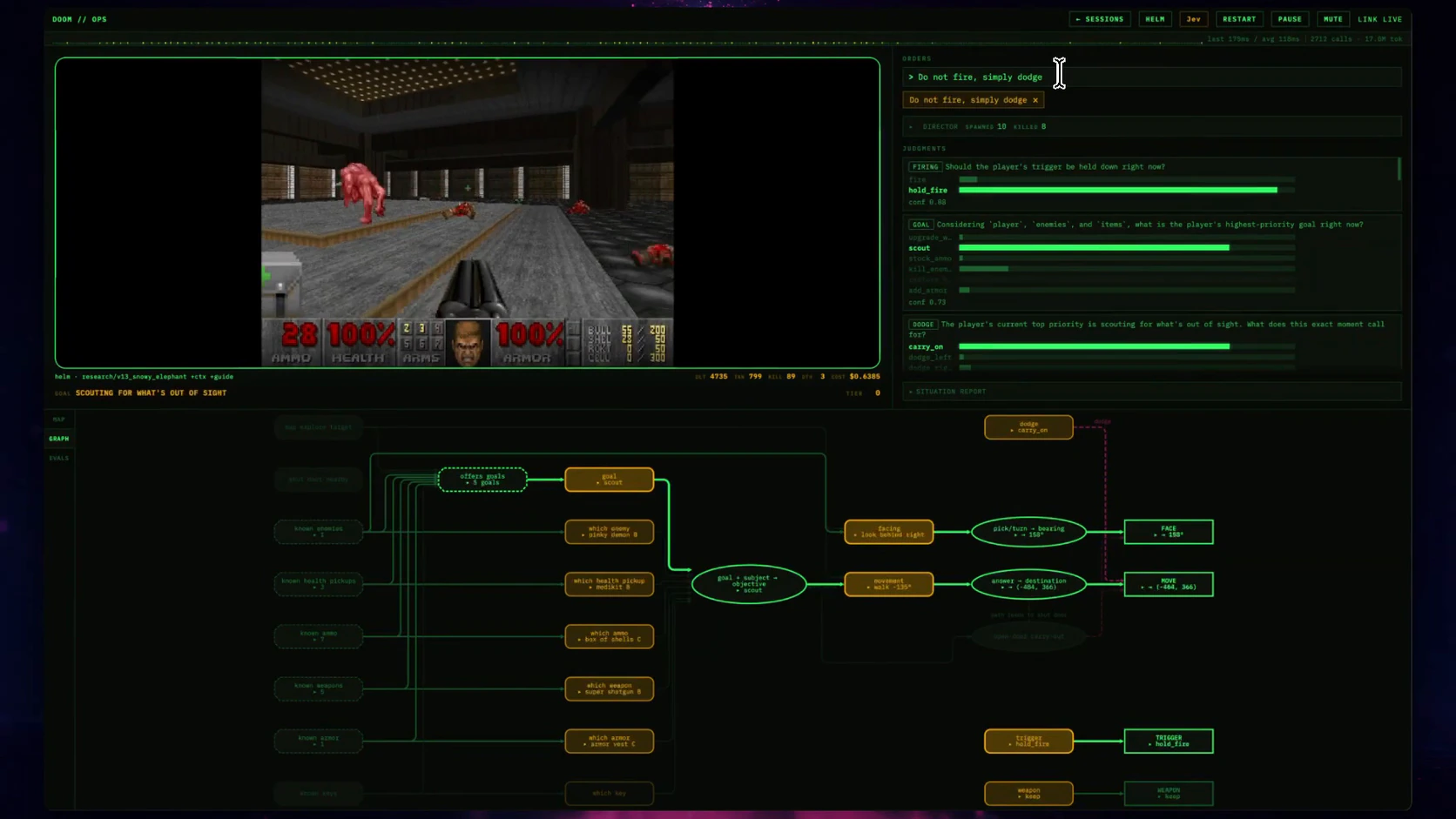
“Do not fire, simply dodge.” TypeSafe turns the old “Can it run Doom?” test into a new question: Can it play Doom? In TypeSafe’s demo, those words change how the AI-controlled player behaves as the game continues. A panel beside the game shows JEV’s judgments updating as it controls the player.
Surely JEV was not designed to play games?
The Doom demo puts JEV’s core capabilities on display: it follows changing instructions, evaluates several independent questions against the same state, and returns answers fast enough to guide a live application.
To do this, the program sends JEV a text description of the game state: the player’s health, nearby enemies, incoming projectiles, and available pickups. Questions about firing, dodging, and priorities all use that same information. JEV evaluates each question independently, without using the other questions’ answers. Code combines the results into the next action, then repeats with the updated state. This is a decision loop: observe, judge, act, and observe again.
JEV guides the player in real time, evaluating the changing game state to inform the next move throughout gameplay. TypeSafe reports roughly ten queries a second in this demo; I have not independently tested that figure. JEV evaluates independent questions in parallel and produces their answers and probabilities together, avoiding the wait for a response to be generated token by token.
The developer changes the instruction, and the same questions and code produce different behavior. JEV evaluates the available actions against the person’s instructions and the current situation.
TypeSafe calls JEV a System One model, drawing on the idea of fast, focused judgment. The developer defines the form of each answer. Ask JEV to choose an action, and it selects from the options you provide. This is what typed means here: the application knows the form of the answer before making the request.
The API offers three kinds of question: Choice selects an option, Score evaluates against a scale, and Noul assigns a value between zero and one to a true-or-false statement. Choice and Score also return probabilities across the possible answers and a confidence value.
[ FIELD NOTE / RESPONSIBILITY ]
You decide how the application acts. JEV supplies the judgment.
Let’s say you are building an interactive tool that teaches students concepts. It has a standard chat interface powered by an LLM, plus teaching skills for hints, worked examples, visual demonstrations, and practice questions. You need the application to decide which skill to use next.
A student comparing fractions writes, “One eighth is bigger than one sixth because eight is bigger than six.” You want the tool to recognize the misconception and choose an activity that helps the student work through it.
In this design, you send JEV the student’s answer, the lesson objective, and the recent conversation. Ask it to identify the likely misconception from categories you define, identify any request for a particular kind of help, and check for the same error in earlier answers. Include an “unclear” category so the application has a route for answers it cannot interpret confidently.
Your code maps the denominator misconception to a fraction-strip activity. The interface displays two equal-length bars, one divided into six pieces and one into eight. The LLM asks the student to compare a piece from each. Their next answer gives the application new context for choosing what to do next.
This design uses a classifier and router. JEV classifies what the answer suggests; the router is the code that selects a teaching skill from those results. A policy such as “offer a hint before showing a worked answer” stays in your application’s rules.
Asking the independent questions together is fan-out. TypeSafe reports that adding questions to one call usually has little effect on response time. Each question must be answerable from the supplied context. A question that needs an earlier result belongs in a later call.
When JEV returns low confidence, route the student to a clarifying question. Confidence-gated routing uses that measure to decide whether the application acts or asks for more information. The teaching approach described here is a design to test with representative student answers; classification accuracy and learning outcomes both need evaluation.
Customer support uses the same pattern. One JEV call evaluates category, urgency, troubleshooting details, and bug severity. Your code routes the ticket and ignores answers that do not apply to the selected route. TypeSafe calls this speculative fan-out: some answers are ready in case the chosen route needs them.
With a coding agent, you’re deciding what to do with the work it produces. Say you ask it to improve a settings page without changing how preferences are saved. The agent produces a patch, and your workflow checks the work before continuing.
Give JEV the request and relevant diff, then ask focused questions: Does this change how preferences are stored? Does it introduce an unrelated feature? Does it violate a named project convention? TypeSafe identifies these kinds of semantic code checks as potential uses for JEV.
Here, JEV fits at a decision gate inside a review loop. Your code combines its judgments with test results and explicit scope checks. A flagged change returns to the agent for revision; an ambiguous result goes to a person. Your existing tests and permission checks remain in the workflow. JEV adds an assessment of what the change means in relation to the assignment.
To try it, replay completed changes that stayed within scope and others that drifted. Check which ones JEV catches, which it misses, and how often it interrupts acceptable work.
In your own work, look for places where an application already has a few possible next actions, but choosing one requires interpreting text. A prompt that asks an LLM to return a category is already doing classification. A growing collection of keyword rules often points to the same need.
For fan-out, inspect sequences of model calls that repeatedly read the same input. If the urgency check uses only the original message, it does not need to wait for the category check. Both belong in the same evaluation. Keep dependent steps separate: judging a newly generated response requires that response to exist first.
These patterns suggest several small integrations to try:
- Email classification — classifier and router. Sort messages into “I need to reply,” “someone else needs to act,” or “reading only.” Code applies labels and routes uncertain cases to review.
- Product feedback — fan-out. Check each entry independently for a bug report, a feature request, and a usability complaint. One comment may contain several.
- Research assistance — decision gate. Compare a claim with its cited passage. Classify the support as direct, partial, contradictory, or missing, then route flagged claims back for revision.
- Search relevance — scoring and ranking. Score each passage against the current question. Code sorts the candidates and passes the most relevant ones to the LLM.
TypeSafe provides an agent skill for Codex, Claude Code, and other coding agents with API documentation and integration patterns. After installing it, ask your agent to help find a first experiment:
Use the TypeSafe skill to inspect this project for classifiers, routers, independent evaluations, and review gates. Find three candidates. For each, name the design pattern, the input JEV would receive, the typed questions, and the code that would act on the answers. Recommend one small experiment using examples I can label myself. Identify where ordinary code already does the job well.
Start with one decision and examples whose expected outcomes you know. Measure accuracy and response time; inspect the mistakes before automating the next action.
JEV plays Doom by evaluating several questions in parallel. The game code turns those judgments into action. The same design fits applications where decisions arrive too quickly for a person to review and require more interpretation than a fixed rule provides.